Practical Toolkit
Ready-to-use tools, checklists, and frameworks that schools can adapt and implement immediately.
Teaching & Learning Tools
Tool 1.1
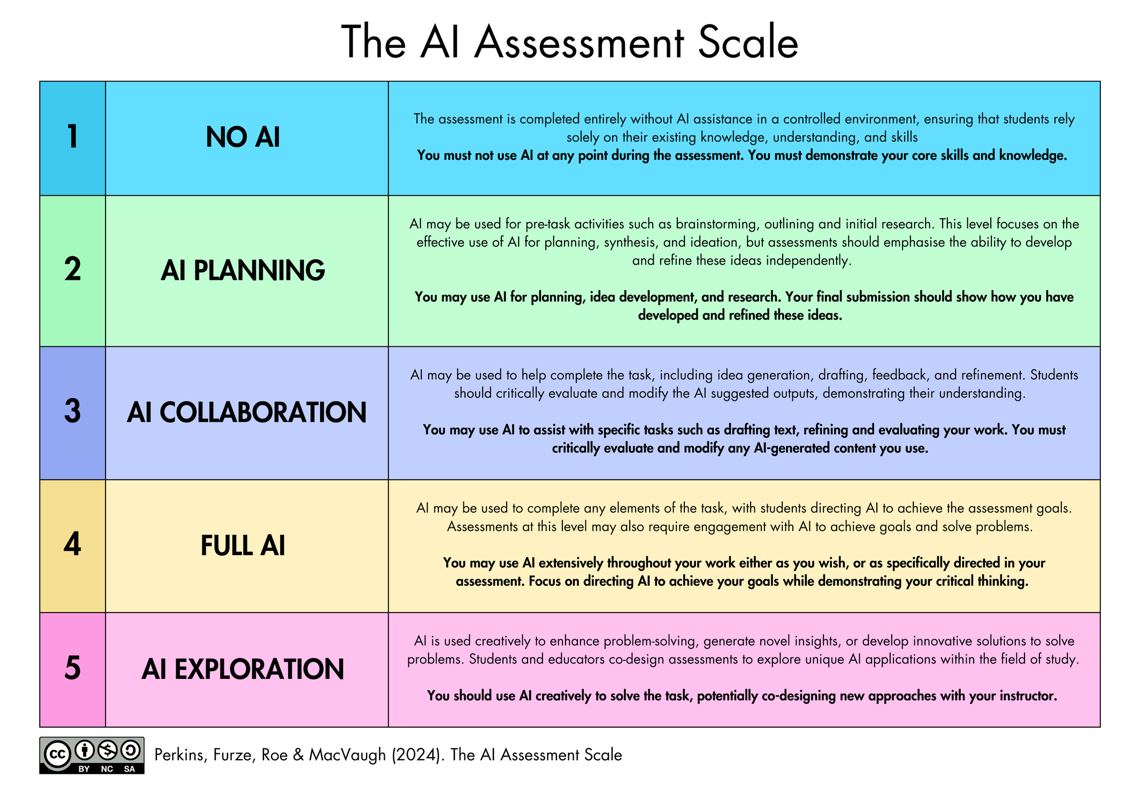
AI Assessment Scale — Quick Reference Card
The AI Assessment Scale should be included on assessment task sheets so that students understand the expectations for each task.
Tool 1.2
Assessment Design Checklist
Use this checklist when designing or reviewing an assessment task. Complete before the task is issued to students.
AI Level and Expectations
- Have I selected a level on the AI Assessment Scale for this task and communicated it clearly to students?
- Is the rationale for this AI level clear — i.e., can I explain why this level is appropriate for this task and this cohort?
Process Visibility
- Does the task require students to show their working, drafts, or thinking process — not just a final product?
- Are there built-in checkpoints where I can observe student thinking?
Task Authenticity and AI Resilience
- Have I tested this task against a current GenAI tool? Could a student submit a high-quality response generated entirely by AI?
- Does the task draw on local, personal, or class-specific knowledge that a general AI model would not have?
- Does the task require genuine evaluation, synthesis, or creation?
Equity and Inclusion
- Does the task advantage students with access to premium AI tools outside school?
- Have I considered how this task works for students with diverse learning needs and EAL/D students?
Cognitive Development
- At the selected AI level, does the student still need to do the hard thinking — or has the AI done it for them?
- Is this task a good use of the student's brain, a good use of the technology, or both?
Tool 1.3
Critical AI Literacy Planning Framework
Map Critical AI Literacy into existing curriculum using the four domains of the OECD/EC AI Literacy Framework.
| Domain | English | Science | Humanities | Arts |
|---|---|---|---|---|
| 1. Engaging with AI | How predictive text and autocomplete shape writing | How AI is used in data analysis and scientific modelling | The history and social impact of automation | AI-generated art and questions of authorship |
| 2. Creating with AI | Using AI to brainstorm, then critically evaluating suggestions | Using AI to generate hypotheses or analyse datasets | Using AI to explore multiple historical perspectives | Co-creating with AI tools and reflecting on the creative process |
| 3. Managing AI | Fact-checking AI-generated text, identifying hallucinations | Evaluating AI model accuracy and limitations | Detecting cultural and ideological bias in AI outputs | Critiquing AI-generated work against human creative standards |
| 4. Designing with AI | Prompt engineering as rhetorical composition | Designing experiments that use AI tools responsibly | Participating in discussions about AI governance and regulation | Designing interactive AI experiences and considering audience impact |
Tool 1.4
Professional Learning Audit
Use this audit annually to evaluate the school's AI professional learning provision. Rate each area as Established, Developing, or Not Yet.
Provision and Structure
- We run at least two whole-staff AI professional learning sessions per year
- AI is integrated into existing PL strands, not treated as a standalone topic
- A designated AI Lead or Digital Learning Lead coordinates AI PL across the school
Coverage Across the Three Pillars
- PL addresses Teaching and Learning (assessment design, AI literacy, cognitive offloading)
- PL addresses Ethics and Wellbeing (deepfakes, bias, social chatbots, environmental impact)
- PL addresses Privacy and Security (data governance, shadow AI, vendor vetting, risk zones)
Culture and Engagement
- Staff feel safe to experiment with AI tools without fear of judgement or reprimand
- There are informal communities of practice where staff exchange AI ideas
- Staff have designated time to explore and trial AI tools relevant to their roles
- The school actively seeks cross-faculty collaboration on AI integration
Tool 1.5
"A Good Use of Your Brain, or a Good Use of the Technology?"
Discussion prompts for staff meetings, student discussions, or pastoral care sessions exploring the distinction between AI as a learning scaffold and AI as a cognitive shortcut.
For Staff Meetings
- Think of a task you recently set. If a student used AI to complete it, what thinking would they have skipped? Does that matter for this task?
- Where in your subject is the "productive struggle"? How do you protect that when AI is available?
- A colleague uses AI to write all their report comments. Is that a good use of the technology, or has something important been lost?
For Student Discussions
- You ask AI to summarise a chapter you haven't read. You ask AI to summarise a chapter you have read. Are these the same thing?
- You use AI to generate three essay plans, then pick the best one and write the essay yourself. Is this learning or shortcutting?
- If you always use GPS, you never learn your way around. What's the equivalent in your subject?
The Core Question: For any use of AI, ask: "Is this a good use of your brain, or a good use of the technology?"
Ethics & Wellbeing Tools
Tool 2.1
Deepfake Incident Response Protocol
Use this protocol when a deepfake involving a student or staff member is reported or discovered. Adapted from eSafety Commissioner Respond 3A guidance (2025).
| Step | Timeline | Key Actions |
|---|---|---|
| 1. Immediate Response | Within hours | Prioritise wellbeing. Do not view, screenshot, save, or share the content. If sexually explicit and involves a minor, report immediately to local police. |
| 2. Support | Within 24 hours | Meet with affected student (and family). Offer counselling. Centre the affected person's agency. |
| 3. Reporting | 24–48 hours | Report to eSafety Commissioner (esafety.gov.au). Follow school behaviour management protocols. |
| 4. Communication | As appropriate | Communicate with broader community if needed, without identifying the affected person. Use as a teaching opportunity. |
| 5. Follow-Up | Ongoing | Regular check-ins with affected person. Review and update response protocol. Include deepfakes in consent education. |
Tool 2.2
Teaching AI Ethics — Resource Bank
The open-access resource site teachingaiethics.com provides inquiry questions, articles, and case studies for teaching AI ethics across disciplines. Published under CC BY-NC-SA 4.0.
Key topics include cognitive offloading, deepfakes, social chatbots, environmental impact, bias, and copyright.
Tool 2.3
Bias Review Checklist
Use before distributing any AI-generated content to students — including lesson materials, assessment tasks, exemplars, images, and feedback.
Representation
- Does the content represent diverse perspectives, or does it default to a single cultural viewpoint?
- Are people from different genders, ethnicities, abilities, and backgrounds represented equitably?
- If images were generated by AI, do they reinforce visual stereotypes?
Cultural Sensitivity and Indigenous Knowledge
- Does the content respect Indigenous Cultural and Intellectual Property (ICIP)?
- Does the content present non-Western cultures and histories accurately?
Accuracy and Framing
- Are claims factually accurate? (AI models frequently hallucinate)
- Does the content present contested topics as settled?
Language and Tone
- Is the language inclusive and accessible?
- Is the reading level and tone appropriate for the intended audience?
Tool 2.4
Social Chatbot Awareness Guide
Designed to help parents, carers, and school staff understand social chatbots and their potential impact on young people.
Warning Signs of Problematic Use
- Referring to a chatbot as a "friend" or "partner"
- Becoming distressed when unable to access the chatbot
- Withdrawing from peer relationships
- Secretive behaviour around chatbot use
- Using a chatbot as a primary source of emotional support
- Spending money on premium chatbot features
Starting Conversations
- Start with curiosity: "I've been reading about apps like Character.AI. Have you come across them?"
- Explore the appeal: "What do you like about talking to it?"
- Discuss the design: "These apps are designed to keep you coming back. How do you think they do that?"
- Name the difference: "A chatbot can respond to what you say, but it doesn't actually care about you."
- Set boundaries together rather than banning outright.
Privacy & Security Tools
Tool 3.1
Risk Zone Quick Reference
Use this to determine which zone an AI use falls into:
| Question | If yes... |
|---|---|
| Does the tool process any student work, learning data, or reports? | Zone 3 — Formal approval required. Speak to ICT Manager. |
| Will AI-generated content reach students? | Zone 2 — Use approved tools. Ensure PL completed. Disclose to students. |
| Is this just for your own professional productivity? | Zone 1 — Go ahead. Be transparent. Don't enter PII or student data. |
If unsure which zone applies, default to the higher zone and check with the AI Lead or ICT Manager.
Tool 3.2
AI Tool Vetting Checklist
Adapted from the UK Department for Education's Generative AI Product Safety Standards (2025). VINE member schools are encouraged to share completed checklists.
- Where is data stored? Is it within Australia or a jurisdiction with equivalent privacy protections?
- Does the vendor confirm that user data is NOT used to train AI models?
- Is there a clear data retention policy? Can data be deleted on request?
- Does the tool comply with the Australian Privacy Principles?
- Are content filtering and safety measures in place?
- Does the tool meet the minimum age requirements for the intended student cohort?
- Is the tool accessible to students with diverse learning needs?
- Does the vendor provide transparency about how the AI model works and its limitations?
- Is there a clear process for reporting safety concerns or inaccurate outputs?
- Does the vendor commit to notifying schools of material changes to terms and conditions?
- Does the tool protect student intellectual property?
- Can usage be logged and monitored for safeguarding purposes?
Tool 3.3
Shadow AI Audit — Conversation Starters
Questions for staff meetings, surveys, or one-on-ones to surface shadow AI use without creating a punitive atmosphere:
- "What AI technologies have you tried recently — approved or otherwise?"
- "Is there anything you wish you could do with AI but can't, because of access or policy?"
- "Has anyone found a platform that works really well for a specific task? Let's talk about whether we can get it approved."
- "Do we know what AI applications are actually being used across the school — not just what's approved?"
Tool 3.4
BMIT Transition Template
When shadow AI use is disclosed or discovered, this template guides a structured conversation to determine an appropriate path forward.
Step 1: Document the Current Use
What tool? Who is using it? What for? How long? What data is being entered?
Step 2: Assess Against the Zone Framework
Could the tool be Approved, Conditionally Approved, or is it Not Permitted?
Step 3: Determine the Transition Pathway
Tool meets Zone 2/3 requirements.
Tool has value but requires safeguards.
Compliance status unclear. Max 4 weeks.
Tool cannot meet compliance requirements.
Key principle: Staff who disclose unapproved tool use are helping the school maintain its security posture and should be thanked, not sanctioned.
Tool 3.5
AI-Adjacent Policy Audit
AI intersects with policies schools already have in place. Use this checklist to audit existing school policies.
- Academic Integrity Policy — Does it address AI use, disclosure requirements, and the AI Assessment Scale?
- Privacy Policy — Does it address AI tool data governance, vendor vetting, and student data?
- Digital Citizenship / Acceptable Use Policy — Does it address social chatbots, deepfakes, and AI-specific risks?
- Staff Code of Conduct — Does it address staff AI use for reporting, communications, and meeting recording?
- Child Safety / Safeguarding Policy — Does it address AI-generated harms including deepfakes?
- Assessment Policy — Does it address AI-resilient assessment design and cognitive offloading?
- Professional Learning Policy — Does it include AI professional learning provision?
- IT Governance / Procurement Policy — Does it include AI tool vetting and shadow AI protocols?
- Communications and Marketing Policy — Does it address AI-generated content and disclosure?
- Wellbeing Policy — Does it address AI-related student anxiety, screen time, and social chatbot risks?